Page 2 of 2
Re: Latest IDF extension for VSCode has broken my compiler
Posted: Fri May 07, 2021 6:11 am
by orbitcoms
Currently I use the IDF terminal "idf.py flash monitor" when I make changes to the spiffs folders and use the compile/flash/monitor icon when only changing code.
Hope they fix the function soon, bit inconvenient doing 2 different processes and remembering I need to do it by command line if programming spiffs flash.
Re: Latest IDF extension for VSCode has broken my compiler
Posted: Fri May 07, 2021 12:04 pm
by stdenits
bit inconvenient doing 2 different processes and remembering I need to do it by command line if programming spiffs flash.
Right click at ESP IDF extension -> Install another version -> Choose 1.0.2 -> Reload VS Code -> Done.
Now, when the chip is flashed, the files will be uploaded.
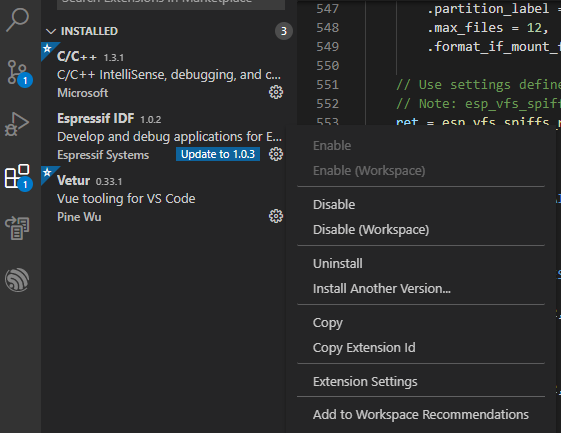
- rollback.png (26.92 KiB) Viewed 4680 times
Re: Latest IDF extension for VSCode has broken my compiler
Posted: Thu May 13, 2021 4:14 pm
by bunfight
bit inconvenient doing 2 different processes and remembering I need to do it by command line if programming spiffs flash.
Right click at ESP IDF extension -> Install another version -> Choose 1.0.2 -> Reload VS Code -> Done.
Now, when the chip is flashed, the files will be uploaded.
rollback.png
"ESP IDF extension -> Install another version " is greyed out and cannot be selected.
At @ext:espressif.esp-idf-extension there is not an option to choose a different version.
I wish to roll back to 1.02; any suggestions would be most welcome. Thanks.
Re: Latest IDF extension for VSCode has broken my compiler
Posted: Fri May 14, 2021 10:08 am
by bunfight
I Uninstalled 1.03 then installed 1.02 from
https://github.com/espressif/vscode-esp ... tag/v1.0.2. Project now builds and flashes OK.
ESP-IDF now highlights "update to 1.03" but "Install Another Version" is not greyed out and many previous versions can be selected whereas this option was unavailable when 1.03 was installed.
Re: Latest IDF extension for VSCode has broken my compiler
Posted: Mon Apr 21, 2025 2:05 am
by Awsmtek
Hello!
I had the same issue.
The solution that I found is to install
ninja (it was absent):
If you're using Windows, please follow installation guide from official
ninja website.
Hope it'll help .