Page 1 of 1

How do I connect ILI9341 Touchscreen to my ESP32

Posted: Mon Oct 27, 2025 4:17 am
by vladanx
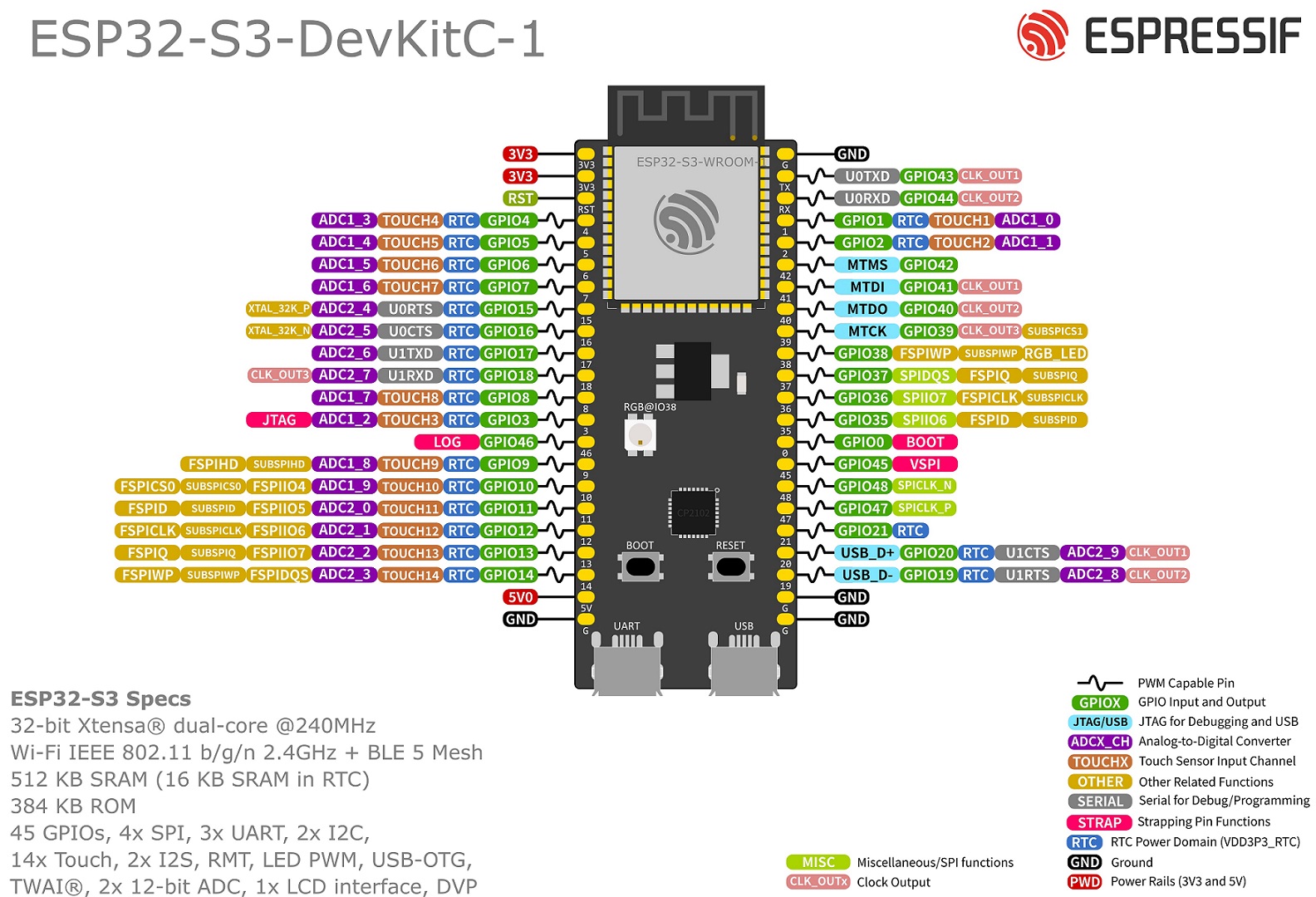
Hello, I am having trouble connecting my ILI9341 Touchscreen to my ESP32-S3-DEVKITC-1U-N8R8. Here is the pin layout of my ESP32: https://docs.espressif.com/projects/esp ... t_v1.1.jpg. As well as the pins on the touchscreen: https://prnt.sc/4WQbVFdnkEtr. The tutorials I’ve found online use different pin layouts than my board, so I’m unsure how to connect the display correctly. Could someone please help me figure out the correct wiring? Thanks a lot in advance for the help.
Re: How do I connect ILI9341 Touchscreen to my ESP32

Posted: Sat Nov 01, 2025 4:39 pm
by lbernstone
The ESP32-S3 is very flexible about what pins you use for a screen like this. Stay away from the pins in the 40s, and you should be fine. Check the pinmap to make sure your selections aren't in use by other hardware.
Here's an example using Arduino and the TFT_eSPI library and pins that just happened to be close to the connections. Note that the touch portion (the T_ pins) have nothing to do with output. Touch should be able to use the same SPI pins with a separate CS pin. T_DIN = MOSI, T_OUT = MISO, T_CLK = SCLK.

Re: How do I connect ILI9341 Touchscreen to my ESP32

Posted: Sun Nov 02, 2025 10:44 pm
by vladanx
The ESP32-S3 is very flexible about what pins you use for a screen like this. Stay away from the pins in the 40s, and you should be fine. Check the pinmap to make sure your selections aren't in use by other hardware.
Here's an example using Arduino and the TFT_eSPI library and pins that just happened to be close to the connections. Note that the touch portion (the T_ pins) have nothing to do with output. Touch should be able to use the same SPI pins with a separate CS pin. T_DIN = MOSI, T_OUT = MISO, T_CLK = SCLK.
Does this look good?

T_IRQ
T_OUT GPIO13
T_DIN GPIO11
T_CS GPIO14
T_CLK GPI012
SDO(MISO) GPIO13
LED 3V3
SCK GPIO12
SDI(MOSI) GPIO11
D/C GPIO7
RESET GPIO6
CS GPIO10
GND GND
VCC 5V