1.Hello everybody, I do not know to overcome this problem. Below is the picture of the VSCode which show in the TERMINAL : Python environment activated but from DOCTOR COMMAND : Python version Not found and Python's pip version Not found.
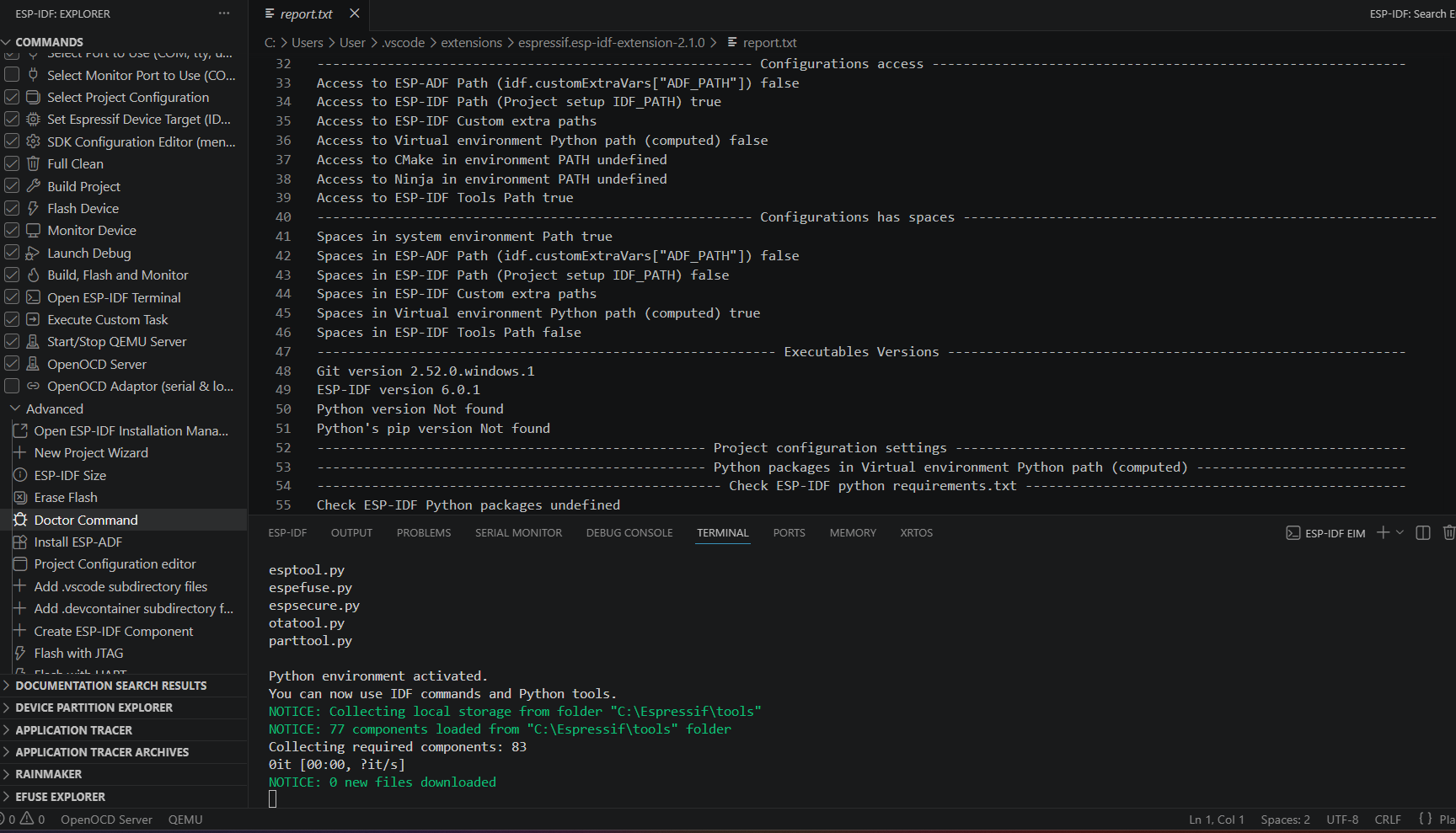
There is python.exe in C:\Espressif\tools\python\v6.0.1\venv but when I use NEW PROJECT WIZARD, it report that is no python.exe
2.How to increase the font size of Espressif-Ide? From the picture attached, only in the red area the font can be increased whereas I want all.
VSCode cannot detect python.exe And Increase Font in IDF IDE.
- Attachments
-
- IdeIDF.png (130.77 KiB) Viewed 60 times
Re: VSCode cannot detect python.exe And Increase Font in IDF IDE.
Hi @MohdRais
Seems that your configuration in the extension is not correct. Because I can't the see actual settings value I don't know what is wrong but the virtual python path says it has spaces and can't be found.
Which extension version, how do you install ESP-IDF ? (using EIM or how ?)
Please share more details or open a GitHub issue in our repository https://github.com/espressif/vscode-esp-idf-extension
Seems that your configuration in the extension is not correct. Because I can't the see actual settings value I don't know what is wrong but the virtual python path says it has spaces and can't be found.
Which extension version, how do you install ESP-IDF ? (using EIM or how ?)
Please share more details or open a GitHub issue in our repository https://github.com/espressif/vscode-esp-idf-extension
Re: VSCode cannot detect python.exe And Increase Font in IDF IDE.
Hello, I am using Window Pro 11 V25H2, IDF-V6.0.1 and IEM V0.13.1.
Re: VSCode cannot detect python.exe And Increase Font in IDF IDE.
HI @bignacio , I am using Window Pro 11, IDF-V6.0.1 and IEM V0.13.1
Who is online
Users browsing this forum: ChatGPT-User, PetalBot, Semrush [Bot] and 2 guests
